The State of NLP in 2026: From Chatbots to Reasoning Agents

The State of NLP in 2026: From Chatbots to Reasoning Agents

The State of NLP in 2026: From Chatbots to Reasoning Agents

For most of the last decade, “natural language processing” meant teaching software to recognize intent, extract entities, or translate a sentence from one language to another. That description is still technically true, but it barely captures what the field has become. The systems now grouped under the NLP umbrella can debug a codebase, work through a multi-step math proof, summarize a 200-page contract, or plan and execute a multi-part task across several apps — and they do it by “thinking” before they answer, not just pattern-matching a reply.

If you last paid close attention to language AI a year or two ago, the landscape has shifted enough that it’s worth a proper update. Here’s where things actually stand in 2026.

Models That Think Before They Speak

The single biggest architectural shift of the last two years is what researchers call test-time compute, or inference-time reasoning. Older language models produced an answer in one pass: read the prompt, generate the reply, done. Reasoning models work differently. Before producing a final answer, they generate an extended internal chain of thought — trying an approach, checking it, backtracking if it doesn’t hold up, and only then writing the response the user actually sees.

This “thinking budget” is now a dial developers can turn. Simple, routine requests get answered quickly with minimal reasoning; a hard math, coding, or multi-step planning problem can trigger tens of thousands of internal reasoning tokens before the model commits to an answer. Nearly every major lab has adopted some version of this approach — it’s become as fundamental to model capability as parameter count and training data used to be. The practical effect for anyone using these tools day to day is noticeable: today’s assistants are markedly better at multi-step logic, catching their own mistakes, and holding up on problems that have a clear right answer.

The Frontier Keeps Moving — Fast

The pace of flagship model releases has become genuinely hard to track. Where a new “best model” used to arrive every six to twelve months, 2026 has seen frontier releases from the major labs landing within weeks of each other, each briefly claiming the top spot on independent benchmarks before the next one ships. The leading model families — from OpenAI, Anthropic, Google, and xAI — have each gone through multiple generations this year alone, and open-weight competitors such as DeepSeek, Qwen, and Meta’s Llama line have kept pace closely enough that the gap between “open” and “closed” frontier models is narrower than it has ever been.

The practical upshot isn’t that any single model is permanently “the best” — it’s that competition has compressed the time between meaningful capability jumps. Pricing has also fallen sharply as providers compete on cost per token as much as raw intelligence, which is a big part of why AI-assisted workflows that were too expensive to run at scale in 2024 are now routine in 2026.

Small Is the New Big

Not every advance in NLP is about bigger, more expensive models. Running in parallel is a strong push toward small language models — often in the 1B to 10B parameter range — that are cheap enough to run on a phone, a laptop, or a single server, yet handle a surprising share of everyday tasks nearly as well as their much larger cousins.

Compact model families from Microsoft, Google, Qwen, Mistral, and Meta have made on-device NLP genuinely practical: real-time transcription, summarization, and assistant features that run locally rather than round-tripping to the cloud. For businesses, that means lower inference costs and better data privacy, since sensitive text never has to leave the device. For consumer products, it means AI features that work offline and respond instantly instead of waiting on a network call. Increasingly, the “which model” question in 2026 gets answered with “the smallest one that’s good enough,” not “the biggest one available.”

From Chatbots to Coworkers: Agentic NLP

Perhaps the most visible shift for regular users is the move from conversational NLP to agentic NLP. A chatbot answers questions. An agent plans a sequence of actions, calls tools and APIs, checks its own results, and adjusts course when something doesn’t go as expected — with minimal hand-holding.

This is now showing up inside real business software rather than as a novelty demo. Agents are being wired directly into CRMs, ticketing systems, codebases, and data warehouses, where they can look something up, take an action, and report back, instead of just describing what a human should do next. Multi-agent setups — where one system plans, another retrieves information, and a third executes or verifies — are increasingly common for complex workflows, echoing how a human team might divide up a project. Industry analysts have pointed to a sharp rise in the share of enterprise applications shipping with task-specific agents built in, up from a small fraction just a couple of years ago. Coding is the clearest example: AI pair-programming tools now routinely handle a substantial share of day-to-day implementation work in many engineering teams, shifting developers toward reviewing, directing, and architecting rather than typing every line by hand.

Beyond Text: Multimodal Understanding

NLP used to mean text in, text out. That boundary has essentially dissolved. Frontier models today process text, images, audio, and video within the same architecture, reasoning across modalities rather than bolting a vision model onto a language model as an afterthought. Ask a modern assistant to look at a screenshot, listen to a voice note, and read a document together, and it can reason about all three at once instead of handling them as separate, disconnected inputs.

This has quietly transformed tools that people don’t always think of as “NLP” — transcription software that doesn’t just convert speech to text but also identifies who’s speaking, flags sentiment, and pulls out action items automatically; support systems that can interpret a photo of a broken product alongside a written complaint; and translation tools that handle spoken and written language with roughly equal fluency.

Grounding AI in What’s Actually True

One of the more practically important trends is the maturity of retrieval-augmented generation, or RAG — systems that pull information from a live knowledge base or document store rather than relying solely on what a model memorized during training. RAG has become the default architecture for enterprise AI deployments for a simple reason: it solves the stale-knowledge problem. Instead of retraining an expensive model every time company data changes, businesses can update a searchable knowledge base and have the AI reflect the change immediately, with the response traceable back to a source document.

Combined with much larger context windows — many current models can process well over a million tokens in a single request — this has made it realistic to point an AI system at an entire codebase, legal archive, or customer history and get a well-grounded answer, rather than a plausible-sounding guess.

Where It’s Actually Showing Up

The theoretical advances matter less than where they’ve landed in practice. A few areas stand out in 2026:

  • Customer support — AI agents now handle a large share of routine, first-line support tickets, with escalation to humans reserved for anything ambiguous or high-stakes.
  • Software development — AI coding assistants have moved from autocomplete to genuinely autonomous debugging, testing, and refactoring within existing codebases.
  • Healthcare documentation — NLP systems summarize clinical notes, flag inconsistencies, and reduce the paperwork burden on physicians, though clinical decisions still sit with human providers.
  • Legal and compliance — contract review, regulatory research, and document discovery that used to take teams of paralegals days now runs in a fraction of the time, with human review as a final check.
  • Low-resource languages — transfer learning has narrowed the long-standing gap between English-language NLP and languages with less digital text available, opening AI tools to markets that were previously underserved.

The Problems Nobody’s Fully Solved

None of this comes without real caveats, and it’s worth naming them plainly. Hallucination — models generating confident, plausible-sounding statements that simply aren’t true — is reduced but not eliminated, and it matters more as these systems get delegated real autonomy. Giving an agent the ability to act, not just talk, raises the stakes of every mistake: a chatbot that hallucinates gives you bad information, but an agent that hallucinates might take the wrong action inside a real system.

There are also open questions around governance and oversight as multi-agent systems become more autonomous, the environmental cost of training and running ever-larger models at scale, and the security risks that come with connecting language models directly to sensitive tools and data. None of these are solved problems in 2026 — they’re active areas of research and, increasingly, regulation.

Where This Leaves Us

The story of NLP in 2026 isn’t really about any single model release — it’s about a set of trends compounding on each other. Reasoning models that check their own work. Agents that act instead of just advising. Small models that put real capability on-device. Multimodal systems that don’t distinguish between text, image, and voice. And retrieval architectures that keep all of it grounded in current, verifiable information.

Individually, none of these ideas is brand new. Together, they’ve turned NLP from a narrow tool for parsing sentences into something closer to a general-purpose interface for getting work done — one that’s increasingly good at knowing when to think longer, when to ask a tool for help, and when to simply answer. The pace shows no sign of slowing, which means whatever “state of the art” means by the time you read this, it’s worth checking again in six months.

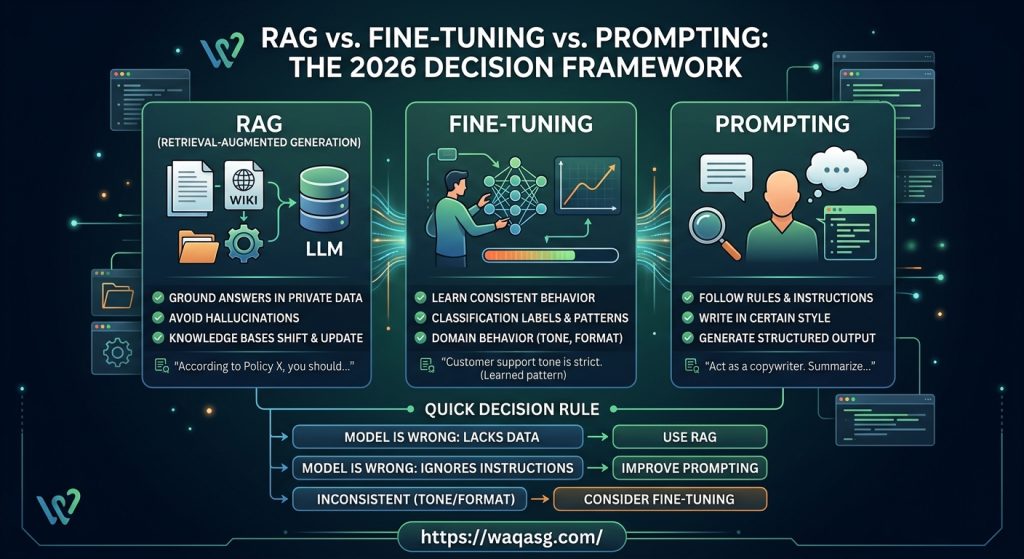
RAG vs Fine-Tuning vs Prompting (2026): Which One Should You Use for Your AI App?

Infographic showing the 2026 decision framework for RAG vs. Fine-Tuning vs. Prompting, explaining when to use each AI architecture for custom applications.

RAG vs. Fine-Tuning vs. Prompting in 2026: The No-Nonsense Guide for AI Builders

If you’re building an AI app right now—whether it’s a customer support bot, an internal copilot, or a smart search tool—you are guaranteed to hit this exact crossroads:

Should I just write a better prompt, spin up a RAG pipeline, or bite the bullet and fine-tune a model?

The developer community loves to overcomplicate this debate. Let’s cut through the noise. Here is the reality in 2026:

  • Prompting is your fastest path to actual value.

  • RAG is your go-to for fresh, private, or factual data.

  • Fine-tuning is your weapon for consistent behavior at scale (assuming you have the data to back it up).

Here is a plain-English breakdown of when each approach actually wins, plus a deployment checklist you can take straight to your next sprint planning.

The Big Three: Quick Definitions

1. Prompting (The Baseline)
You give the model explicit instructions, rules, and maybe a few examples right inside the prompt.

  • When to use it: You want the model to adopt a specific persona, follow a set of rules, or output a basic structured format. Start here. Always.

2. RAG (Retrieval-Augmented Generation)
You retrieve relevant text from your own shifting data sources (policies, wikis, live databases) and inject it into the prompt so the model has the right context before it answers.

  • When to use it: The model needs to ground its answers in your specific, evolving knowledge base to avoid hallucinating.

3. Fine-Tuning (The Behavior Shaper)
You train the model on a curated dataset so it bakes in specific patterns, tones, or classification logic at a fundamental level.

  • When to use it: You need massive consistency, lower latency at scale, or highly niche domain behavior that prompting just can’t reliably enforce.

The Golden Rule for Decision Making

If you only bookmark one thing from this post, make it this framework:

  • If the model is failing because it lacks your proprietary data → Build RAG.

  • If the model is failing because it ignores your instructions → Improve your Prompting.

  • If the model gets it right sometimes, but is annoyingly inconsistent with its tone or format → Look into Fine-Tuning.

What I’d Choose in the Real World

Let’s look at some actual production scenarios and how to solve them:

  • Scenario A: “I need a bot to answer HR questions from our company PDFs.”

    • The Pick: RAG. The truth lives in those documents, and HR policies change. Fine-tuning on a PDF that will be outdated next month is a trap.

  • Scenario B: “I need to turn messy user feedback into perfectly formatted Jira tickets.”

    • The Pick: Prompting first, Fine-Tuning later. Modern models can handle formatting via prompting. But if you are processing thousands of tickets a day and need 99.9% structural reliability, fine-tune it.

  • Scenario C: “A customer-facing assistant that absolutely cannot hallucinate.”

    • The Pick: RAG + Guardrails. RAG forces the model to cite your trusted sources, while programmatic guardrails ensure it gracefully refuses to answer things it shouldn’t.

  • Scenario D: “I need to route incoming emails into 12 distinct support categories.”

    • The Pick: Fine-Tuning (or a traditional small classifier). Classification requires stable, repeatable decisions. This is fine-tuning’s bread and butter.

The Hard Truth About RAG

A lot of teams still think RAG just means “dumping your docs into a vector database.” That is the easy part. The things that will actually break your app in production are:

  1. Chunking: How you slice your text. Too small, and the model loses context. Too big, and you introduce irrelevant noise.

  2. Retrieval Quality: Can your system actually grab the right paragraph out of 10,000 pages?

  3. Evaluation: How are you mathematically proving the model’s answer matches the retrieved text?

The “Day One” RAG Checklist

If you’re building RAG this week, don’t over-engineer it. Start here:

  • Clean your data: Strip out nav bars, messy HTML, and repeated footers.

  • Chunk by meaning: Split by headings and sections, not arbitrary character counts.

  • Keep the metadata: Always store the source URL, update date, and section title.

  • Limit the context: Only feed the model the top 3 to 5 retrieved chunks.

  • Lock it down: Explicitly prompt the model to only use the provided text, and to say “I don’t know” if the answer isn’t there.

When Fine-Tuning is Actually Worth the Headache

Fine-tuning is expensive and time-consuming. It is a terrible solution for fixing a knowledge gap, but it is an incredible tool when:

  • You have hundreds (or thousands) of high-quality examples of the perfect output.

  • You need to force a strict, predictable output format for an API to consume.

  • You need the model to adopt a highly specialized tone (like legal or medical compliance) perfectly, every single time.

The 2026 Developer Workflow

If you are spinning up a new AI feature today, here is the exact order of operations to keep your team moving fast without building tech debt:

  1. Start with Prompting: Get immediate feedback and validate the use case.

  2. Add RAG: Do this the second you realize the model needs access to private or changing data.

  3. Consider Fine-Tuning: Bring this in only when you hit scale and need to ruthlessly optimize for consistency, speed, or token costs.

  4. Evaluate Early: Build a small test set of 50-100 queries on day one. Stop guessing if your tweaks are working; measure them.

Final Thoughts

Does RAG replace fine-tuning? No. RAG brings the knowledge; fine-tuning shapes the behavior. They are incredibly powerful when combined.

Is prompt engineering dead? Not even close. Models are smarter, but garbage in still equals garbage out. Clear instructions and solid architecture still win.

What are you building right now? Drop a comment below with your use case (chatbot, semantic search, workflow automation) and what your data looks like. Let’s map out your architecture together.


Infographic showing the 2026 decision framework for RAG vs. Fine-Tuning vs. Prompting, explaining when to use each AI architecture for custom applications.

Top AI Solutions Helping Small Businesses Thrive in 2025

Artificial intelligence software for startups

In this article, we will discover the top AI solutions helping small businesses thrive in 2025. And learn how these powerful tools that can save time, cut costs, & boost growth in today’s highly competitive market.

Introduction

Running a small business in 2025 is not an easy task. And, the competition is fierce, customer expectations are sky-high, & time always feels short. But there’s good news: Artificial Intelligence (AI) is no longer just for tech giants or Fortune 500 companies. Today, there are dozens of affordable, easy-to-use AI solutions designed specifically to help small businesses work smarter, save money, & grow faster.

In this article, we will explore the top AI solutions, which can make a real difference for small businesses in 2025 — and how you can start using them to thrive in the digital age.

Why AI is a Game-Changer for Small Businesses in 2025

AI has shifted from being a futuristic concept to a must-have tool for businesses of all sizes, anywhere on this planet. According to a 2025 industry report, more than 60% of small businesses now use at least one AI-powered tool, from marketing automation to customer service bots.

Here’s why:

  • Saves Time: Automates repetitive tasks like emails, scheduling, and data entry.
  • Cuts Costs: Reduces the need for large teams while improving efficiency.
  • Improves Decisions: Uses data-driven insights to help you make smarter choices.
  • Enhances Customer Experience: Personalizes offers and provides 24/7 support.

Top AI Solutions Helping Small Businesses Thrive in 2025

Here are some of the best AI-powered tools every small business owner should know about this year:

1. ChatGPT Business

Category: Customer Support & Content Creation

ChatGPT Business helps small businesses create professional emails, blogs, product descriptions, and even customer service scripts. It can handle inquiries instantly, freeing up your time for other tasks.

Key Benefits:

  • Generates marketing content in seconds
  • Provides instant, human-like customer responses
  • Saves time and reduces support costs

2. Jasper AI

Category: Copywriting & Marketing

Jasper AI is a favorite among small businesses for creating ad copy, social media posts, and blog articles with minimal effort.

Key Benefits:

  • Creates high-converting ad campaigns
  • SEO-optimized writing for better search rankings
  • Saves hours of manual writing

3. Hootsuite Insights (Powered by AI)

Category: Social Media Management

This tool helps businesses analyze customer behavior and automate posting schedules across multiple platforms.

Key Benefits:

  • Tracks trending topics in real time
  • Schedules posts automatically
  • Improves audience engagement

4. HubSpot AI CRM

Category: Customer Relationship Management

HubSpot’s AI-powered CRM helps small businesses manage leads, track sales, and predict customer behavior, making it easier to close deals.

Key Benefits:

  • AI-driven sales recommendations
  • Automated follow-up emails
  • Centralized customer data

5. QuickBooks AI

Category: Accounting & Finance

QuickBooks now uses AI to automate bookkeeping, send invoices, and track expenses, reducing human errors.

Key Benefits:

  • Automates repetitive financial tasks
  • Provides real-time financial reports
  • Helps avoid tax filing mistakes

6. Grammarly Business AI

Category: Writing & Communication

Grammarly AI goes beyond spell-checking—it suggests better tone, structure, and clarity in emails and documents, which is essential for professional communication.

Key Benefits:

  • Improves writing quality instantly
  • Detects tone for better customer communication
  • Works across multiple apps

7. Zapier AI

Category: Workflow Automation

Zapier uses AI to connect different apps and automate workflows (e.g., automatically sending leads from your website to your CRM).

Key Benefits:

  • Saves time by reducing manual data entry
  • Connects over 5,000 tools and apps
  • Easy to set up, no coding required

8. Pictory AI

Category: Video Content Creation

Perfect for small businesses wanting to create short marketing videos for TikTok, Instagram, or YouTube without expensive equipment or editors.

Key Benefits:

  • Turns text into videos in minutes
  • Adds captions and music automatically
  • Great for ads and social media content

9. Tidio AI Chatbot

Category: Customer Service

Tidio’s AI chatbot allows you to answer customer questions 24/7, even while you sleep, improving customer satisfaction.

Key Benefits:

  • Handles multiple customers simultaneously
  • Provides instant answers to FAQs
  • Converts visitors into paying customers

10. ClickUp AI

Category: Project Management

ClickUp’s AI assistant helps teams organize tasks, draft emails, and even summarize meetings, improving productivity.

Key Benefits:

  • Reduces time spent on planning
  • Keeps projects on track
  • Helps small teams stay organized

How to Choose the Right AI Solution for Your Business

Not all AI tools are created equal. Before investing, consider:

  • Budget: Start with affordable tools or free trials.
  • Ease of Use: Pick software that doesn’t require tech expertise.
  • Integration: Ensure it works with your existing tools.
  • Scalability: Choose solutions that can grow with your business.

To Sum Up

AI is no longer a luxury for big companies—it’s a powerful, affordable tool for small businesses looking to scale fast. Whether you want to automate your marketing, improve customer support, or save hours on administrative tasks, these AI solutions can help you work smarter, not harder in 2025.

🚀 Start small, experiment with a few tools, and watch how AI transforms your business this year.

FAQs

1. Are AI tools expensive for small businesses?

No. Many AI solutions now offer affordable plans or free tiers, making them accessible even to startups.

2. Do I need technical skills to use AI tools?

Most modern AI tools are designed for beginners, requiring little to no technical expertise.

3. Can AI tools replace human employees?

Not entirely. AI helps automate repetitive tasks, allowing humans to focus on more strategic and creative work.

How to Start a Career in AI Without a Computer Science Degree

How to Start a Career in AI Without a Computer Science Degree

Artificial Intelligence (AI) is no longer just a buzzword or the subject of futuristic sci-fi movies. It’s here, it’s real, and it’s revolutionizing industries across the globe—from healthcare to finance, retail to education. The exciting part? You don’t need a computer science degree to jump into this field and build a meaningful, high-impact career.

In fact, more and more people from non-traditional backgrounds are breaking into AI, leveraging their unique perspectives, domain knowledge, and self-taught tech skills to contribute to the AI revolution. Whether you’re an artist, a teacher, a business analyst, or a marketer, this guide will show you how to start a career in AI—no computer science degree required.

Why AI is a Field Open to Everyone

The field of AI is incredibly interdisciplinary. It combines math, data, programming, ethics, design, linguistics, and even philosophy. As such, there are multiple entry points depending on your interests and current skill set. In today’s tech-driven world, what matters more than formal degrees is your ability to learn, adapt, and apply knowledge.

With free online resources, open-source tools, and a global community eager to share knowledge, starting a career in AI has never been more accessible.

Step 1: Understand What AI Really Is

Before diving in, take some time to understand what AI entails. At its core, AI is about building systems that can simulate intelligent behavior. Some key subfields include:

Machine Learning (ML): Training computers to learn from data.

Natural Language Processing (NLP): Enabling machines to understand human language.

Computer Vision: Teaching machines to interpret visual data.

Robotics: Creating intelligent machines that can move and act.

Once you understand the landscape, you’ll be better equipped to choose the path that suits your strengths and interests.

Step 2: Learn the Basics of Python

Python is the go-to programming language for AI and machine learning. Don’t worry if you’ve never coded before—Python is one of the most beginner-friendly languages out there.

Where to Start:

  • Codecademy
  • freeCodeCamp
  • Coursera Python for Everybody

Even just a basic understanding of Python will open the door to a wide range of tutorials and tools used in AI.

Step 3: Get Comfortable with Data

AI is all about data. The more comfortable you are with understanding, cleaning, and visualizing data, the better prepared you’ll be.

Learn Tools Like:

  • Pandas for data manipulation
  • Matplotlib and Seaborn for data visualization
  • NumPy for numerical operations

You don’t need a degree to get started with data. Just start working with real datasets from platforms like:

  • Kaggle
  • UCI Machine Learning Repository

Step 4: Take AI and Machine Learning Courses

Thanks to the rise of online education, you can learn from world-class universities and tech companies without setting foot in a classroom.

Recommended Courses:

  • Andrew Ng’s Machine Learning Course on Coursera
  • Google’s Machine Learning Crash Course
  • fast.ai’s Practical Deep Learning for Coders

These courses cover core concepts such as supervised learning, unsupervised learning, model evaluation, and neural networks. They often include hands-on projects that build real-world skills.

Step 5: Build Projects to Show What You Know

One of the best ways to demonstrate your skills (especially without a degree) is to build and showcase AI projects. These can be small or ambitious—but they should reflect your interest and creativity.

Project Ideas:

  • Predict stock market trends using historical data
  • Build a chatbot with natural language processing
  • Classify images using convolutional neural networks
  • Analyze social media sentiment using Twitter data

Share your work on GitHub and write about your process on platforms like Medium or a personal blog. This not only strengthens your understanding but also builds a portfolio that potential employers can see.

Step 6: Get Involved in the AI Community

Networking is key—especially when you don’t have a traditional background. The good news is the AI community is open, collaborative, and global.

Ways to Connect:

  • Join AI and ML groups on LinkedIn and Reddit
  • Participate in Kaggle competitions
  • Attend meetups, webinars, and virtual conferences
  • Contribute to open-source projects

Connecting with others can help you learn faster, discover opportunities, and stay motivated.

Step 7: Tailor Your Resume and Apply for Roles

Once you have some solid projects and a basic understanding of AI principles, you’re ready to apply. Many companies value skills, curiosity, and problem-solving over formal credentials.

Focus on Roles Like:

  • Data Analyst or Junior Data Scientist
  • Machine Learning Engineer (entry-level)
  • AI Product Manager
  • NLP Specialist
  • AI Research Assistant

Make sure to tailor your resume to highlight your self-taught skills, projects, and passion. Use your cover letter to explain your non-traditional background and why it makes you a unique asset.

Real Stories: Non-CS Professionals in AI

Many successful AI professionals started from unexpected backgrounds. Here are a few examples:

  • Rachel Thomas, co-founder of fast.ai, was a math professor before diving into deep learning.
  • Jeremy Howard, the other fast.ai co-founder, had a background in philosophy and business.
  • Monica Rogati, a well-known data scientist, earned her PhD in computer science but emphasizes that curiosity and problem-solving matter more than credentials.

These stories highlight a growing truth: AI needs diverse thinkers. Your background is not a barrier—it’s a strength.

Bonus: Free Resources to Boost Your Journey

Books: “Hands-On Machine Learning with Scikit-Learn, Keras, and TensorFlow” by Aurélien Géron

Podcasts: Lex Fridman Podcast, Data Skeptic

YouTube Channels: StatQuest, Sentdex, Two Minute Papers

Newsletters: The Batch by Andrew Ng, Towards Data Science Weekly

Final Thoughts

Breaking into AI without a computer science degree is not only possible—it’s becoming the norm. The future of AI is bright, and it belongs to anyone with curiosity, dedication, and a willingness to learn.

You don’t need to be a coding wizard or math genius to get started. You just need to start. Build one project. Take one course. Join one community. Then keep going.

AI is the future. And it’s a future you can be a part of—no degree required.

How to Learn AI and Machine Learning from Scratch

Discover how to learn AI and machine learning from scratch with this step-by-step guide. Explore essential skills, programming tools, real-world projects, and resources to kickstart your journey in AI and ML.

How to Learn AI and Machine Learning from Scratch

The Artificial Intelligence (AI) and the Machine Learning (ML) technologies are transforming industries at an unprecedented pace, through driving innovation across fields like healthcare, finance, cybersecurity, and automation. Lets take an example from self-driving cars to personalized recommendations on streaming platforms. The AI and ML are shaping the way we interact with technology daily. By having the increasing demand for AI professionals, now is the perfect time to start learning these cutting-edge technologies.

Whether you’re a complete beginner with no prior coding experience or someone with a programming background looking to expand into AI and ML, this guide provides a structured, step-by-step approach to help you navigate the learning process. By mastering fundamental concepts, working on real-world projects, and staying updated with industry trends, you can unlock countless opportunities in this fast-growing field. Let’s dive in!

1. Understanding the Basics of AI and ML

Before jumping into coding and algorithms, it’s essential to grasp the fundamental concepts:

  • Artificial Intelligence (AI): The simulation of human intelligence in machines.
  • Machine Learning (ML): A subset of AI that allows machines to learn from data.
  • Deep Learning: A more advanced subset of ML that uses neural networks to analyze vast amounts of data.

For a deeper understanding of how AI is shaping industries, check out The Future of Artificial Intelligence in Software Development and The Role of Artificial Intelligence in Modern Healthcare.

2. Learn the Prerequisite Skills

To effectively learn AI and ML, you need a solid foundation in the following areas:

  • Mathematics: Linear algebra, probability, statistics, and calculus.
  • Programming: Python is the most popular language for AI and ML development.
  • Data Science: Understanding data manipulation, visualization, and analysis.

If you’re interested in securing your data while working with AI, read How to Secure Your Devices and Data in 2025.

Learn AI and Machine Learning from Scratch

3. Get Hands-On with Python Programming

Python is widely used in AI and ML due to its simplicity and vast libraries. Some must-learn libraries include:

  • NumPy and Pandas for data manipulation.
  • Matplotlib and Seaborn for data visualization.
  • Scikit-learn for basic ML algorithms.
  • TensorFlow and PyTorch for deep learning.

If you’re struggling with a slow computer while coding, check out How to Fix a Slow Laptop: 7 Proven Speed Boosts.

4. Explore Machine Learning Algorithms

Machine learning models can be broadly classified into:

  • Supervised Learning: Algorithms like Linear Regression, Decision Trees, and Neural Networks.
  • Unsupervised Learning: Clustering algorithms like K-Means and Principal Component Analysis (PCA).
  • Reinforcement Learning: Algorithms like Q-Learning and Deep Q Networks (DQN).

For more insights into AI’s impact on the future, read AI Revolution: How Artificial Intelligence is Shaping Our World.

5. Work on Real-World Projects

Applying AI and ML concepts in real-world projects enhances your learning. Some beginner-friendly projects include:

  • Sentiment analysis of customer reviews.
  • Spam email detection.
  • Image classification using deep learning.

If you want to create visually appealing content for AI projects, check out How to Create Stunning Images, Engaging Content, and Eye-Catching Graphics.

6. Leverage AI in Your Daily Life

AI is not just for experts; it can improve productivity in various ways. Learn more in How to Use AI to Boost Productivity in 2025 and Unlocking Personal Growth: How to Use AI to Enhance Your Life.

7. Stay Updated and Keep Practicing

AI and ML are rapidly evolving fields, so continuous learning is essential. Stay updated by:

  • Reading research papers on arXiv and Google Scholar.
  • Enrolling in courses on Coursera, Udacity, or edX.
  • Joining AI communities and forums like Kaggle and GitHub.

For insights into the broader tech landscape, explore The Future is Now: How Cutting-Edge Tech is Changing Everything.

Conclusion

Learning AI and Machine Learning from scratch may seem daunting, but with the right approach, structured learning, and consistent practice, you can develop expertise in these fields. Start by building a strong foundation in mathematics, programming, and data science. Apply your knowledge by working on real-world projects and experimenting with different machine learning algorithms. Stay engaged with the latest industry trends, research papers, and AI communities to continuously refine your skills.

AI and ML are shaping the future, and by investing your time and effort now, you can open doors to exciting career opportunities and innovative projects. Whether you’re looking to advance your professional career, launch a startup, or simply explore AI for personal growth, there’s never been a better time to begin. So take that first step today—your AI journey starts now!

For more insights on staying ahead in the tech industry, check out How to Future-Proof Your Tech Career: Essential Skills for 2025 and Beyond.