If you are one of the many Apple users in Pakistan using an iPhone, iPad, or MacBook, backing up your data is essential. iCloud is the most seamless cloud storage option available, as it is tightly integrated with Apple devices and can easily be shared with your family.
Every Apple account comes with 5GB of free basic storage, but if you need more room for your photos and backups, upgrading is very straightforward.
Apple cloud Storage Plans And prices for Pakistan in rupees
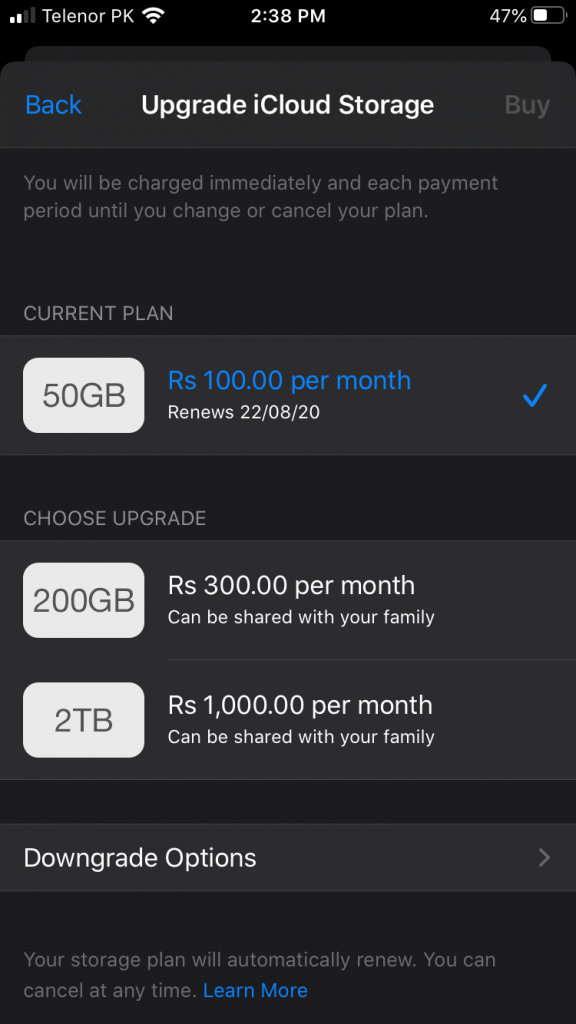
Apple iCloud+ Storage Plans and Prices (PKR)
Apple recently updated its storage plans for Pakistan, which now include extra perks like Apple TV and Apple Arcade bundles. Here is the current breakdown in Pakistani Rupees:
Important Note: Unlike in the past, all paid iCloud+ plans (even the basic 50GB option) can now be shared with up to five family members at no extra cost!
Prerequisites to Pay in Apple iTunes
Before you upgrade, make sure you have the following ready:
An Apple device (iPhone, iPad, or MacBook).
An active Credit or Debit Card with a sufficient balance.
Your card must be enabled by your bank for online and international transactions.
Does Apple accept UnionPay debit cards in Pakistan? Unfortunately, Apple does not accept payments via UnionPay. You must use a Visa or Mastercard to buy storage or make purchases on the App Store and iTunes.
Step-by-Step Guide to Upgrading
First, ensure your payment information (Visa/Mastercard) is added to your Apple ID account.
Open Settings on your device and tap your Name/Apple ID at the top.
Go to iCloud, then tap Manage Account Storage.
Select Change Storage Plan (your default will show as 5GB).
Tap on the 50GB plan—or any other tier you prefer—and confirm.
The money will automatically deduct from your card, and your storage limit will update instantly across all your Apple devices.
If you have any further questions, please ask me in the comment section! Thank you for reading. If you liked this article, please leave a comment to help others find it.
JazakAllah.
Prerequisite to pay In Apple iTunes
- Apple device
- Credit or Debit Card
Any Apple product iPhone, iPad or MacBook is required. Second you need a debit card or credit card and you should have sufficient balance in your respective account.
First of all you should add your information into your Apple account, then go to storage plan. Your default should be 5GB. Then click on 50 GB or any other plan. After that it will automatically deduct money and your plans will be updated on all of your devices.
Can Apple accept union pay debit card?
Unfortunately Apple do not accept payment from Union Pay, so you must have Visa or MasterCard to buy something on App Store or iTunes
If you have any further questions please ask me in the comment section
Thank you for reading.
If you like this article please leave a comment for search Engine.
JazakAllah.