iCloud vs Dropbox vs Google Cloud Storage: Comparison

iCloud vs Google Drive vs Dropbox

Undoubtedly all of us are familiar with cloud storage services. Most of us are already using cloud services one way or another. For instance, if you store your contacts in your Gmail ID or iCloud account then you are already using free cloud storage.

In this article, I will highlight the pros and cons of each of the following services Specifically to the countries of South Asia Such as India and Pakistan.

Google Drive offers 15 GB after storage free of cost which is shared among Google services such as Gmail Google photos et cetera. Another benefit of using Google Drive is that you can use it on any of your devices. Like android mobile device, iPhone or iPad and on your personal computer.

Most importantly Google Drive also sports and not only windows but also Mac OS many distributions of the Linux operating system.

Apple iCloud also offers a handsome amount of storage that is sufficient for a general user. But it is two times less than Google Drive storage. iCloud offers 5GB after storage free of cost.

If you have highly invested in Apple products, then you should go for iCloud. Because there are many benefits of using iCloud on your Apple devices you can instantly share things on your devices. And regularly backup your devices or erase your data remotely.

If you are the one who does not have many iCloud devices. So, it will not be much beneficial to store your data in iCloud. Because One cannot back up his android phone with iCloud storage.

How to buy iCloud storage from Pakistan

As compared to iCloud Google offers a diverse range of support on different platforms.

Dropbox is a great platform for personal and professional users who wants to share files. It also offers productivity tools which are useful in collaboration. If this is the case then you should go for Dropbox. Undoubtedly it is one of the greatest platforms in the market.

However, Dropbox is expensive as compared to Google One and iCloud. Because it does not offers smaller packages like Google One or iCloud. If you want to try out the Dropbox cloud, the 2GB basic package is free to use which is extendable up to 18 GB’s.

If the cost is the factor of choosing your cloud storage then I would highly recommend that choose from iCloud or Google Drive. Because both of them offers smaller packages like $1 or $2 packages. On the other hand, Dropbox offers at $10 amount Monthly.

To sum up, Google Drive, iCloud or Dropbox all of the services are great. I have used them all of the free and premium services during the last five years. So I can say that they works great around the year. As you can see that Dropbox is expensive but it also offers premium services. On the other hand, Google Drive and iCloud are Tightly coupled with android and iOS devices respectively.

So if you want to use the cloud storage for your personal needs then iCloud our Google Drive would be sufficient for you. In case you are interested in premium services and want to use the predictive the tools that Dropbox offers then you should check it out the Dropbox.

Thank you for reading, If you still have any questions regarding the above-mentioned services are you going to raise in the comment section. I will try to answer your queries as soon as possible.

JazakAllah,

How to buy iCloud storage from Pakistan

If you are one of the many Apple users in Pakistan using an iPhone, iPad, or MacBook, backing up your data is essential. iCloud is the most seamless cloud storage option available, as it is tightly integrated with Apple devices and can easily be shared with your family.

Every Apple account comes with 5GB of free basic storage, but if you need more room for your photos and backups, upgrading is very straightforward.


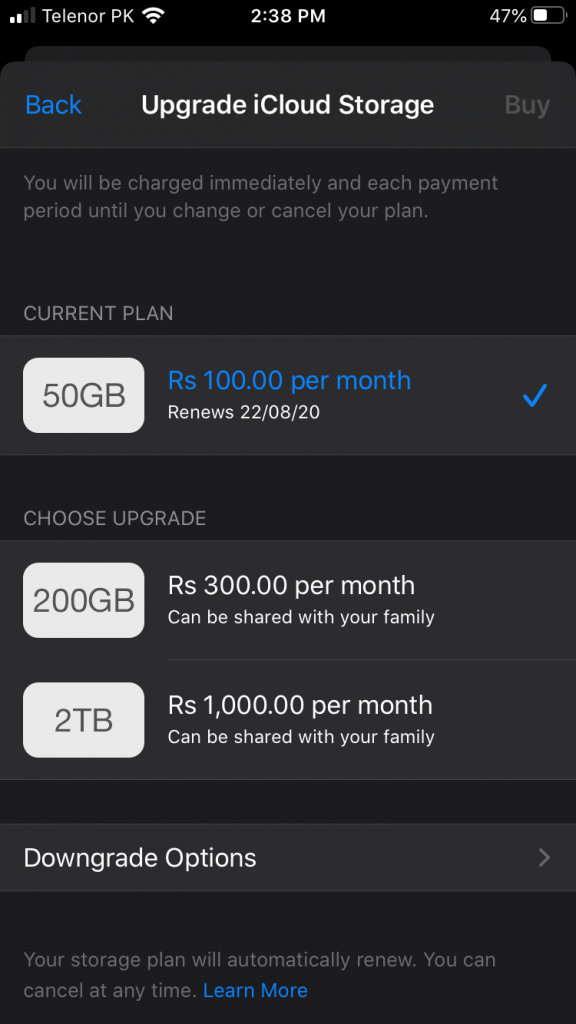
Apple cloud Storage Plans And prices for Pakistan in rupees

Apple ICloud Storage Plans

Apple iCloud+ Storage Plans and Prices (PKR)

Apple recently updated its storage plans for Pakistan, which now include extra perks like Apple TV and Apple Arcade bundles. Here is the current breakdown in Pakistani Rupees:

Storage PlanMonthly PriceSharing & Features
50 GBRs. 200Family Sharing, 1-camera Secure Video
200 GBRs. 800Family Sharing, 5-camera Secure Video
2 TBRs. 2,500Family Sharing, Unlimited Secure Video
6 TBRs. 8,900Ideal for professional creators
12 TBRs. 17,900Ultimate storage for massive archives

Important Note: Unlike in the past, all paid iCloud+ plans (even the basic 50GB option) can now be shared with up to five family members at no extra cost!

Prerequisites to Pay in Apple iTunes

Before you upgrade, make sure you have the following ready:

  • An Apple device (iPhone, iPad, or MacBook).

  • An active Credit or Debit Card with a sufficient balance.

  • Your card must be enabled by your bank for online and international transactions.

Does Apple accept UnionPay debit cards in Pakistan? Unfortunately, Apple does not accept payments via UnionPay. You must use a Visa or Mastercard to buy storage or make purchases on the App Store and iTunes.

Step-by-Step Guide to Upgrading

  1. First, ensure your payment information (Visa/Mastercard) is added to your Apple ID account.

  2. Open Settings on your device and tap your Name/Apple ID at the top.

  3. Go to iCloud, then tap Manage Account Storage.

  4. Select Change Storage Plan (your default will show as 5GB).

  5. Tap on the 50GB plan—or any other tier you prefer—and confirm.

  6. The money will automatically deduct from your card, and your storage limit will update instantly across all your Apple devices.

If you have any further questions, please ask me in the comment section! Thank you for reading. If you liked this article, please leave a comment to help others find it.

JazakAllah.


Prerequisite to pay In Apple iTunes

  1. Apple device
  2. Credit or Debit Card

Any Apple product iPhone, iPad or MacBook is required. Second you need a debit card or credit card and you should have sufficient balance in your respective account.

First of all you should add your information into your Apple account, then go to storage plan. Your default should be 5GB. Then click on 50 GB or any other plan. After that it will automatically deduct money and your plans will be updated on all of your devices.

Can Apple accept union pay debit card?

Unfortunately Apple do not accept payment from Union Pay, so you must have Visa or MasterCard to buy something on App Store or iTunes

If you have any further questions please ask me in the comment section

Thank you for reading.

If you like this article please leave a comment for search Engine.

JazakAllah.